Appearance
SSLCommerz Plugin Configuration
How to Generate SSLCommerz API Keys?
Generate API Key
SSLCommerz payment in Live mode
Register a Merchant Account (Live Mode)
- Go to the SSLCommerz website: https://www.sslcommerz.com
- Click on “Merchant Signup” or visit: https://developer.sslcommerz.com/registration/
- Fill in your business details and select Live Account.
Register a Merchant Account (Live Mode)
- First, log in to your merchant account: https://sslcommerz.com/
- After logging in, go to your SSLCommerz Live Dashboard
- Navigate to the “My Stores” section in the menu.
- You will see your Store ID and can generate or copy your API credentials (which include the Store Password / Secret Key).
SSLCommerz payment in Sandbox mode
Create a Sandbox (Test) Account
- Visit the SSLCommerz Developer Sandbox Portal: https://sandbox.sslcommerz.com
- Click on “Register Now” or go directly to: https://developer.sslcommerz.com/registration/
- Choose “Sandbox” while filling out the form.
- Submit the form. After registration, log in to: https://sandbox.sslcommerz.com
Get Store ID and Secret Key
- Please check your email to get the store ID and secret key(password) if not received any emails regarding getting the store ID, then follow the steps below.
- Go to “Dashboard”.
- Navigate to “My Stores” on the sidebar.
- You will see a default store listed.
- Click on the store to view:
- Store ID: Your store ID
- Store Password (Secret Key): password
SSLCommerz Setup
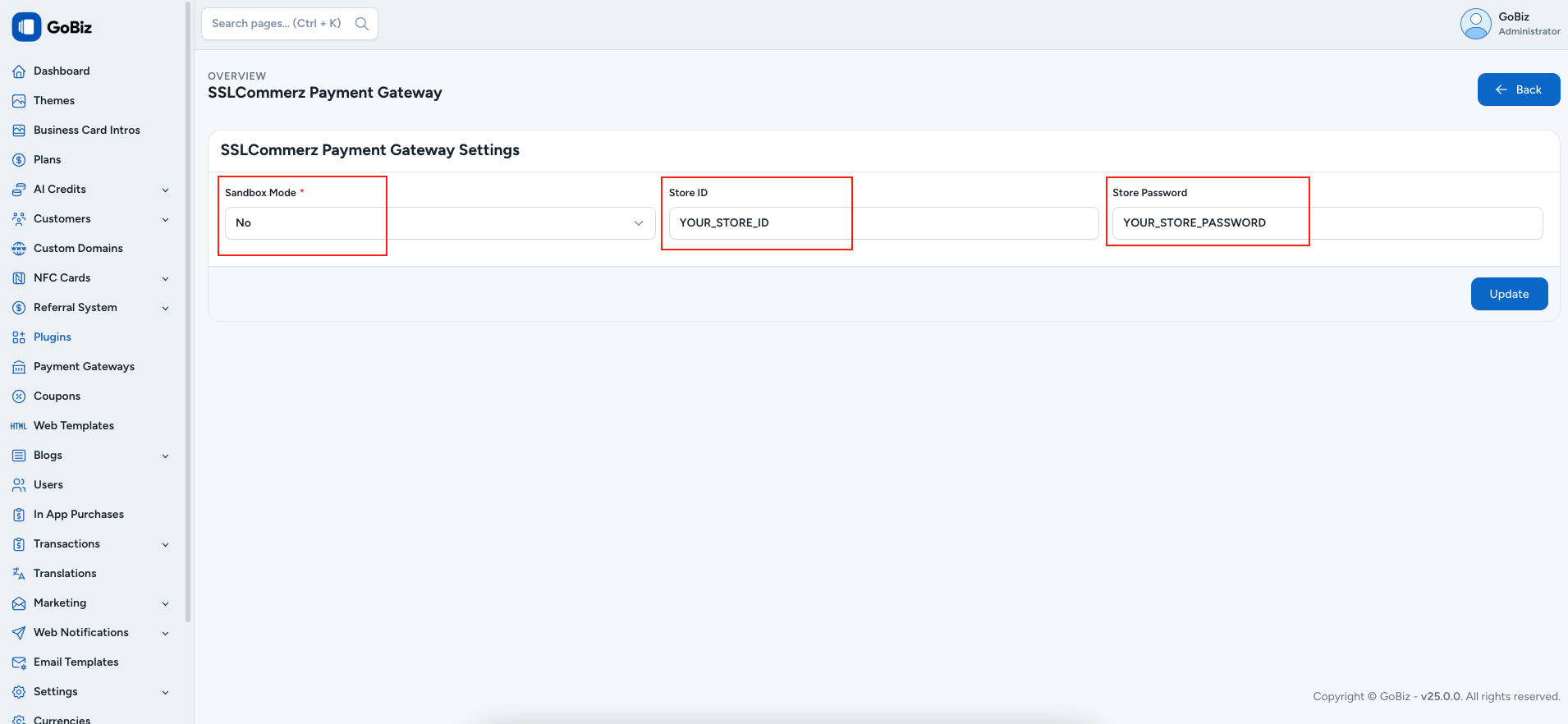
To configure the payment methods, go to: Plugins -> SSLCommerz -> Settings.
On the configuration page, select Yes in Sandbox Mode if you want to use SSLCommerz Sandbox for testing payments. Select No to use SSLCommerz Live Mode for real transactions.
After selecting the mode, enter your Store ID and Store Password (Secret Key) in the respective fields.
For Sandbox mode, use your Sandbox Store ID and Sandbox Store Password. For Live mode, use your Live Store ID and Live Store Password.
After entering all the details, click Update to save the SSLCommerz payment gateway configuration.